
One platform. Every tool your business needs.
Certxa covers the full day at your business — from the first online booking to end-of-day close, payroll, client notifications, waitlist management, and review management. Built for nail salons, hair salons, barbershops, spas, massage studios, hair removal studios, and braid and weave salons.
Clients book online, around the clock.
Give every client a booking page where they pick their service, provider, and time — from any device, any time of day. Clients can book directly from your website, a direct link, Google, or Instagram. Service-specific options like nail length, shape, and design are available for nail salons.
Automated text and email reminders go out before every appointment, and instant confirmations are sent the moment a booking is made. Clients can reschedule from the same confirmation link without calling.
- Service, provider, and time selection
- Service-specific options at booking (e.g. nail length, shape, and design)
- Book from your website, Google, or Instagram
- Automated text and email reminders
- Instant booking confirmations
- Client self-service rescheduling
- Google and Apple Calendar feed

Every team member's day, at a glance.
A live multi-staff calendar gives your whole team instant visibility of every appointment, break, and booking gap. Appointments are color-coded by team member so the front desk can see the full picture in seconds.
Drag and drop to move appointments, block time for breaks and holidays, and print a daily run sheet in one click. Walk-ins appear alongside bookings so nothing falls through the cracks.
- Live multi-staff calendar view
- Color-coded by team member
- Drag-and-drop rescheduling
- Block time for breaks and holidays
- Printable daily run sheets
- Walk-ins alongside bookings

Clients check themselves in.
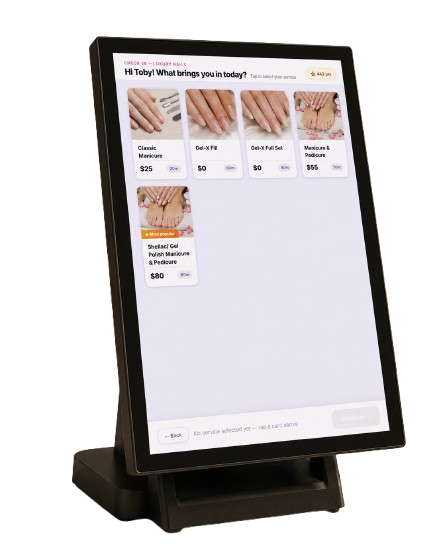
A tablet at the front door lets clients check in with their phone number or a QR code, choose their service, and join the queue without waiting for staff. Service-specific options — like nail length and shape for nail salons, or treatment type for spas and massage studios — are presented at check-in.
The kiosk recognizes returning clients and suggests what they are due for based on their visit history. It prints a check-in slip and works in English, Spanish, Vietnamese, Chinese, and Korean.
- Check in by phone number or QR code
- Returning client recognition and service suggestions
- Service-specific options at check-in
- Joins queue and prints check-in slip
- English, Spanish, Vietnamese, Chinese, and Korean

Checkout in seconds, not minutes.
A touch-screen POS handles tickets, services, add-ons, discounts, tips, and split payments — all synced instantly to every client record. Accept card payments with a card reader, cash, and gift cards.
Print receipts, open the cash drawer, and close the day with a cash count and printed report. Works across multiple front desk stations and keeps running when the internet goes down.
- Services, add-ons, discounts, and tips in one checkout
- Split payments and gift card redemption
- Tipping prompts on every transaction
- Next-day payouts to your bank
- Syncs to client profiles automatically
- Receipt printing and cash drawer
- Multi-station support
- Offline mode — saves tickets when internet is down

Never lose a walk-in again.
When your business is fully booked, Certxa captures walk-ins on a live digital waitlist. The moment a slot opens up, the next client is automatically notified and given a simple confirmation window — so you fill cancellations instantly without any manual follow-up.
Clients on the waitlist can see their estimated wait time, and loyalty members can be given priority. Every walk-in is captured, every slot is filled.
- Live digital waitlist for walk-ins
- Auto-text when a slot opens
- One-tap client confirmation
- Priority bumping for loyalty members
- Estimated wait time display

The right message, at the right moment.
Certxa handles every client communication automatically — booking confirmations, appointment reminders, rescheduling alerts, waitlist notifications, and post-visit review requests. Clients always know where they stand without your staff making a single call.
When a client is overdue for their next visit, Certxa sends a personalized re-engagement text at exactly the right time — based on their own visit history, not a generic schedule.
- Booking confirmations and reminders via SMS and email
- Rescheduling and cancellation alerts
- Waitlist slot-open notifications
- Post-visit review request texts
- Personalized re-engagement texts for overdue clients

Fair turns, automatically.
Certxa assigns walk-ins to staff members automatically based on rules the business sets. The turn board shows who is next, who is with a client, and who is on a break — keeping things fair and transparent for the whole team.
- Automatic turn assignment for walk-ins
- Business-set rotation rules
- Live view of next, busy, and on-break status

Pay your team accurately, every time.
Set commission rates per staff member and track tips separately. Add recurring deductions the owner sets, run pay periods, and print earnings statements and paychecks.
Every paycheck includes a breakdown of exactly which tickets earned each commission, so there are no disputes and no guesswork.
- Per-staff commission rates
- Tips tracked separately
- Recurring deductions
- Pay periods and earnings statements
- Printed paychecks
- Ticket-level commission breakdown

Two loyalty programs. One happy client base.
Choose the program that fits your business. The digital punch card awards one punch per visit — once a client reaches the number you set, a reward is automatically applied at checkout. No paper cards, no manual tracking.
Prefer a points-based program? Clients earn points for every dollar they spend. You set the rewards — a dollar-off discount, a free add-on, whatever works for your business. Every client also has a full profile with visit history and preferences, and you can send targeted text campaigns to bring people back during slow periods.
- Digital punch card — one punch per visit, reward at your set threshold
- Points program — clients earn points per dollar spent
- Owner sets all reward values and thresholds
- Rewards automatically applied at checkout when earned
- Client profiles with full visit history and preferences
- Gift cards
- Targeted text message campaigns

Know exactly where your revenue is going.
Certxa monitors your booking data continuously and surfaces the revenue opportunities your team would otherwise miss. When a client drifts past their usual visit cadence, a personalized re-engagement text goes out automatically — no manual follow-up needed.
See which time slots are consistently underbooked, which staff members have the highest rebooking rates, and which clients are at risk of churning — all in one place. A monthly revenue leakage report shows exactly which lapsed clients represent lost income, with a one-tap option to reach them.
- Client drift detection — auto-texts overdue clients at the right moment
- Monthly revenue leakage report with lapsed client list
- Dead seat intelligence — identifies and helps fill slow time slots
- No-show risk scoring for upcoming appointments
- Rebooking rate by staff member
- Smart cancellation recovery — auto-fills gaps from waitlist and lapsed clients
- Client lifetime value and churn risk scoring
- Business health score — retention, utilization, and rebooking in one number

More five-star reviews, on autopilot.
After every visit, Certxa automatically texts the client asking for a review. Happy clients are sent straight to your Google review page. Unhappy clients can reach you privately first, so you can fix problems before they go public.
See all your Google reviews in one place, get alerts for new ones, reply from inside Certxa, and keep your Google Business Profile up to date — including your booking link.
- Automatic post-visit review request by text
- Happy clients directed to Google review page
- Private feedback channel for unhappy clients
- All Google reviews in one place with alerts
- Reply to reviews from inside Certxa
- Google Business Profile kept up to date

Your receptionist, available 24/7.
Autumn answers every call within two seconds — booking new appointments, handling rescheduling and cancellations, answering questions about services and pricing, and upselling add-ons. All without you lifting a finger.
While your salon is open, Autumn sees your live board: who is clocked in, who is with a client, and how many people are waiting. She gives callers a real wait time — not a guess. After hours, she keeps booking and answering questions without implying anyone is in the building.
- Answers every call in under 2 seconds, 24/7
- Books, reschedules, and cancels appointments in real time
- Knows live wait times and staff availability
- Upsells add-ons and premium services on every call
- Recognises returning clients by name and history
- After-hours answering — keeps booking when the salon is closed
- No extra subscription — pay only for active call minutes
See how Certxa compares
Switching from another platform? See a feature-by-feature breakdown.